


PedidosYa - Delivery Online
4.68.22K Reviews
App Specs
- Version
- 10.32.10.4
- Updated On
- License
- Free
- Downloads
- 50,000,000+
- Developer
- PedidosYa S.A
- Categories
- Food & Drink
- Platform
- Android, iOS
Screenshots




 Analysis by AppCompare
When I think about trusting a food-delivery app, I look beyond the menu: I want to know what I can check before paying, how much choice I have during checkout, and whether the process feels clear enough to use when I’m hungry and in a hurry. PedidosYa is a Food & Drink app from PedidosYa S.A, and it brings restaurant and supermarket ordering together in one place. It is free, rated for Everyone, and has a 4.6 average from around 2.1 million ratings, so it has a substantial audience—but popularity alone doesn’t tell me whether its ordering flow suits my habits.
What I check before trusting an order
For me, trust starts with the details I can see while choosing, not with broad promises. Restaurant ratings and customer reviews give me a way to compare options before I commit, and the menu lets me inspect what I’m about to order. I treat those signals as useful context rather than guarantees: reviews can help me spot patterns, but they can’t promise that every order will arrive exactly as expected.
The app’s reach is notable: it has over 50 million installs and has been available since 2012. That makes it a familiar option for many people, but I still recommend judging it by the restaurants and supermarkets actually shown for your location. A large service can be convenient without offering the same selection everywhere, so I would check availability before building a routine around it.
Choices that matter at checkout
The ordering flow gives me practical choices, including customizing items, adding instructions, and scheduling a delivery for later. Those controls are most useful when I have a specific request or want to plan ahead rather than place an order in a rush. I would read each item and instruction carefully before submitting, especially when a meal has several modifications; a short, specific note is easier to follow than a long explanation.
Payment options are presented in the app, which can make checkout easier than arranging cash at the door. I would still pause at the final review screen to check the order, delivery details, and selected payment method before confirming. That small habit matters in any ordering app: it gives me a chance to catch an accidental item or an outdated address before the order is underway.
Data-sensitive moments and personal agency
Food orders can reveal everyday routines through the places and times a person buys meals. I don’t treat that observation as evidence of any particular data practice; it simply makes me careful about what I choose to share. I would enter only the information needed to place an order, review account and device choices when setting up the app, and avoid assuming that a convenient checkout means every privacy setting is automatically right for me.
Before granting any device permission, I would consider whether it is needed for the task I’m doing and look for an option to continue without it. I also prefer to check the account controls directly rather than infer what is available from the ordering experience. That approach keeps the decision in my hands: use the app for the order I want, and make choices about account details and device access deliberately.
Worth Reading Before You Choose

Flipboard Shows What News Apps Must Do Beyond the Feed

Switching to Android Auto Means Rethinking Your Driving Routine

Google Calendar Makes a Crowded Week Easier to Manage

Ludo King Makes the Most of the Minutes Between Plans

Baby Panda World Brings Quick Play to Modern Phones, but Its Game Library Feels Busy

ESPN’s Live Game View Makes Following Close Games Easier
A useful routine is to confirm the delivery address and contact details each time I order somewhere new, then check the order summary before paying. If I’m placing a planned order, I’d review the scheduled time and instructions too. These checks aren’t complicated, but they reduce avoidable confusion and help me stay in control of the parts of the transaction that I can verify on screen.
Using PedidosYa in everyday life
I use this section to consider how the app fits into an ordinary routine, beyond the moment of choosing dinner. A small habit that helps is treating each order as a fresh check: confirm the destination, read the summary, and make sure the selected details still match what I want. That keeps convenience from turning into autopilot and leads naturally to a closer look at getting started.
Getting Started with PedidosYa
First things first, downloading PedidosYa from the app store is a breeze. Whether you're an Android aficionado or an iOS enthusiast, you’ll find the app ready for action. Once installed, the experience kicks off with a clean and intuitive interface that guides you through setting up your account. No tech degree required here—just a few taps and you're all set.
As you dive in, you’ll notice the app is ridiculously user-friendly. The search function is on point, allowing you to filter by cuisine, distance, or even by specific dishes if you’re feeling particular. It's all about zeroing in on exactly what your taste buds are craving.
The current version is 10.20.7.1, and the minimum operating-system requirement is version 7.0. I’d check that your device meets the requirement before trying to install it. After opening the app, my practical advice is to search for an actual meal you would order rather than browse randomly: that quickly shows whether the nearby choices match your tastes and whether the app feels worth keeping installed.
Exploring the Menu
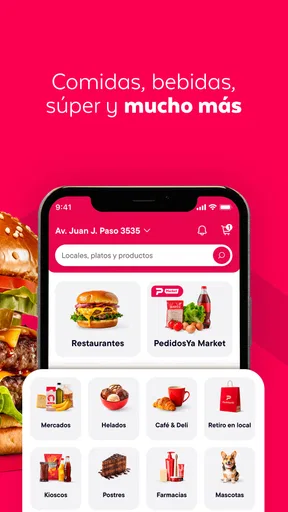
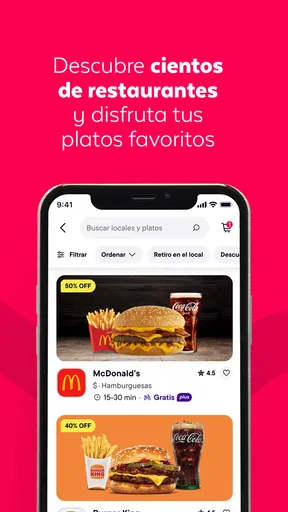
Now, onto the fun part—browsing through a smorgasbord of options. PedidosYa boasts an impressive array of restaurants and eateries, from local favorites to international chains. Whether you're in the mood for sushi, pizza, or something totally new, there’s a little something for everyone.
One cool feature is the rating system. Each restaurant comes with customer reviews and ratings, helping you dodge those culinary nightmares and zero in on top-notch bites. Plus, who doesn't love a good recommendation?
I find reviews most helpful when I use them to answer a narrow question, such as whether people repeatedly mention missing items or whether a dish travels well. A single glowing comment is less useful than a pattern across several opinions. For a first order from a place, I’d choose something straightforward and familiar from the menu rather than testing several unfamiliar dishes at once; it makes it easier to judge whether that restaurant is a good fit for next time.
Supermarket shopping is a different use case from choosing a restaurant meal. It can be handy when I need a few essentials without making a separate trip, but I would make a list first and check the items carefully before submitting. For a large shop where I need to compare products in person, or where exact substitutions matter, going to a store myself may be the better option.
Ordering Made Simple
When it comes to placing an order, PedidosYa makes it as simple as pie. Literally, you could order pie in just a few taps. You can customize your order to your heart’s content, add special instructions, and even schedule deliveries for later. Talk about convenience!
The app also offers multiple payment options, from credit cards to digital wallets, making the checkout process as smooth as butter. No more scrambling for cash when the delivery guy shows up. It’s all handled seamlessly within the app.
One realistic example is a busy evening when I’m finishing work and know I won’t have time to cook. I can look for a nearby meal, check the restaurant feedback, add a clear note if I need a modification, and schedule the order if I want it to arrive around a particular part of the evening. The key trade-off is that planning ahead only helps if I double-check the chosen time and the final order; I wouldn’t treat a schedule as a reason to skip reviewing the details.
Compared with calling restaurants directly, an app makes it easier to browse several menus and keep the order details together in one place. Calling can still be preferable if I have a complicated request and want to explain it in conversation. Compared with cooking or shopping in person, delivery saves a trip and effort, but it gives me less direct control over preparation and product selection. I’d choose the method based on what matters most that day, rather than assuming delivery is always the best value or the easiest answer.
Tracking and Delivery
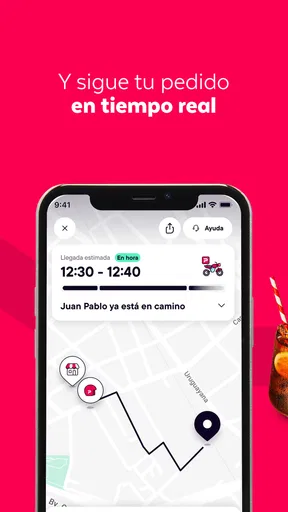
One of my favorite features has to be the real-time tracking. Once your order is confirmed, you can track its journey from the restaurant to your door. It’s like having a tiny GPS for your food. No more staring out the window wondering if your delivery is on its way—it’s all there, live and updated.
And hey, the delivery times are pretty spot on. Most of my orders have arrived within the estimated timeframe, which is always a win in my book. The delivery folks are generally friendly and professional, adding a nice touch to the whole experience.
Tracking is useful for deciding whether to stay near the door or continue with what I’m doing, but I wouldn’t use an on-screen estimate as a guarantee. If timing is critical—say, coordinating food for guests—I’d leave a buffer and avoid ordering at the last possible moment. If a delivery looks delayed or something is wrong, I’d use the app’s available order information and support route rather than relying on an assumption about what happened.
Another small but useful habit is to make delivery instructions easy to act on. I’d keep them focused on the practical details a courier needs, and make sure the address is correct before confirming. This matters most when ordering to a workplace, a shared building, or somewhere different from home, where a saved or partially completed address can cause avoidable mix-ups.
Deals and Discounts
If you’re a bargain hunter like me, you’ll love the deals and discounts section. PedidosYa often features special promotions, offering everything from free delivery to discounted meals. It’s a great way to try something new without breaking the bank.
Keep an eye out for those little red tags—they’re your ticket to some seriously tasty savings. Plus, who doesn't love scoring a deal?
I’d compare the final total and the actual meal I want rather than choosing a restaurant just because something is marked as a deal. A promotion only helps if the available items suit me and the order still makes sense. For a routine meal, checking more than one nearby option can be worthwhile; when I’m short on time, though, I’d rather choose a dependable familiar order than spend too long chasing a small saving.
Who will get the most from it
I see this app as a good fit for people who already know what they want to eat, appreciate having restaurant and supermarket options together, and value placing an order without calling around. It can also suit someone planning a meal for later or coordinating a casual get-together, because being able to review several choices and keep the order in one place makes the process less scattered.
It is less compelling for someone who rarely orders delivery, prefers to choose groceries in person, or needs detailed reassurance about a restaurant before trying it. A local restaurant’s own ordering channel may be more direct for a regular customer, while cooking or shopping yourself offers more control over ingredients and timing. If the app’s available choices near you don’t match your needs, its broad reach elsewhere won’t make it the right option for your particular order.
The Verdict
So, is PedidosYa worth a download? Absolutely! It’s a reliable companion for those days when cooking is just not an option. With its user-friendly interface, vast selection of eateries, and seamless ordering process, it’s no wonder it’s become a go-to app for many foodies.
Whether you're planning a lazy night in or hosting a last-minute get-together, PedidosYa has got your back. So go ahead, give it a whirl and let your taste buds embark on a culinary adventure without ever leaving the couch. Happy munching!
My recommendation is enthusiastic but not unconditional: I’d try it for a specific nearby order, check the restaurant feedback and checkout details, and then decide whether the selection and delivery experience suit my routine. Its free download and familiar ordering flow make trying it straightforward, while ratings, reviews, and tracking offer useful points of reference. I’d still keep control of personal choices, verify each order before paying, and use another route when calling, shopping in person, or cooking gives me more confidence or control.
Pros
- User-friendly interface enhances ordering experience.
- Wide variety of restaurants and cuisines available.
- Real-time tracking ensures precise delivery updates.
- Multiple payment options
- including cash and card.
- Frequent promotions and discounts for savings.
Cons
- Occasional delays during peak hours.
- Limited delivery areas in smaller towns.
- Some menus may not be fully updated.
- High service fees during busy times.
- Customer support can be slow to respond.
FAQs for PedidosYa - Delivery Online
What types of services does PedidosYa offer?
PedidosYa is a comprehensive delivery app that offers a wide range of services, including restaurant food delivery, grocery shopping, pharmacy items, and even courier services. Users can browse through various categories to find exactly what they need, making it a versatile choice for fulfilling multiple delivery needs.
Is PedidosYa available in my area?
PedidosYa operates in several countries across Latin America, including Argentina, Chile, and Uruguay, among others. To determine if it's available in your area, you can visit their website or download the app, which will prompt you to enter your location to check for service availability.
How does the payment process work on PedidosYa?
The app supports a variety of payment methods to ensure convenience and security for its users. You can pay using credit or debit cards, cash on delivery, or through digital wallets. The payment process is seamless and integrated within the app, ensuring a hassle-free experience.
What are the delivery times for orders placed on PedidosYa?
Delivery times on PedidosYa can vary based on factors like your location, the type of service requested, and restaurant or store preparation times. Generally, users can expect a range from 30 minutes to an hour. The app provides real-time tracking to keep you updated on your order status.
How does PedidosYa handle customer service and complaints?
PedidosYa offers robust customer support, accessible through the app or their website. Users can report issues directly through the app, whether it's about an order or service experience. The customer support team is responsive and aims to resolve complaints efficiently to ensure customer satisfaction.


